Why 14 KB?
Here’s some real requests for reference.
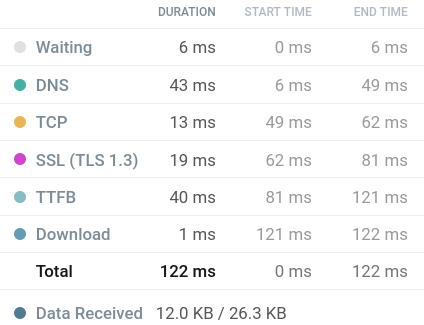
A site that fits in 14kb:
One that doesn’t:
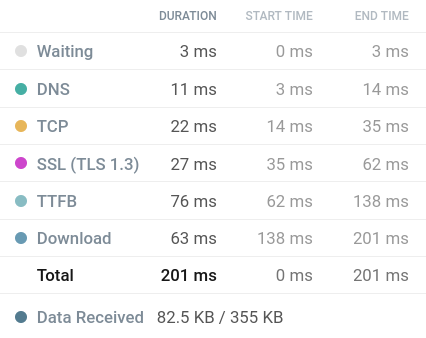
Download is the actual site content. 1 ms vs 63 ms - a 63x speed difference, with only a 7x weight difference.
TCP Slow Start
Fucking TCP won’t spit out content in one packet. Even when the server is ready to respond - TCP says: “hold up bro, we have congestion control”:
It starts with initcwnd - 10 segments (RFC 6928) - that’s 1460 bytes each.
- Server sent 14 KB - waits for ACK,
- ACK arrived - window doubles to 20 segments (~29kb),
- Sent 29KB now - waits again…
And so on until everything is transmitted.
Each loop is one RTT, so the bigger the response (our content), the more rounds. If the response fits in 14.6 KB - it flies out as a single packet.
No waiting && no doubling && no extra RTTs.
:: One round trip.
For large files (images and other heavy content) this isn’t a problem, because TCP manages to ramp up. But in most cases websites have files under 100kb - and that’s a real problem.
And that’s assuming you only have one request. What about separate fonts, scripts, images - each goes through the full cycle. One page pulls 5-10-20 sequential requests, and each one wastes time on protocol chitchat instead of transferring useful data.
As a very bad example - New-York Times - 891 http requests for 9mb of content, 6 seconds of blocking time, even though the site is literally a standard newspaper layout with nothing heavy.
Clubs
There’s the 14KB Club - sites under 14 KB raw. They count uncompressed size, so basically they won’t let in a site that’s, say, 20-30kb, but thanks to gzip compression could fit in 1rtt, and in reality would be only 50-200 ns (nanoseconds) slower than an uncompressed site.
512KB Club - if you don’t fit in here, it’s a fucking disrespect to users and the internet as a whole. Delete your site.
this rant does not apply to useful content on a site, like photo-video
My efforts
I have this site sccl.cc. It’s built on Zine - an SSG in Zig. Three pages: contacts, projects, peripherals.
Originally the server was serving:
- HTML (~15kb)
- Space Mono, Martian Mono woff2 (~40kb)
- Avatar png (~2mb)
- Favicon png (~1mb)
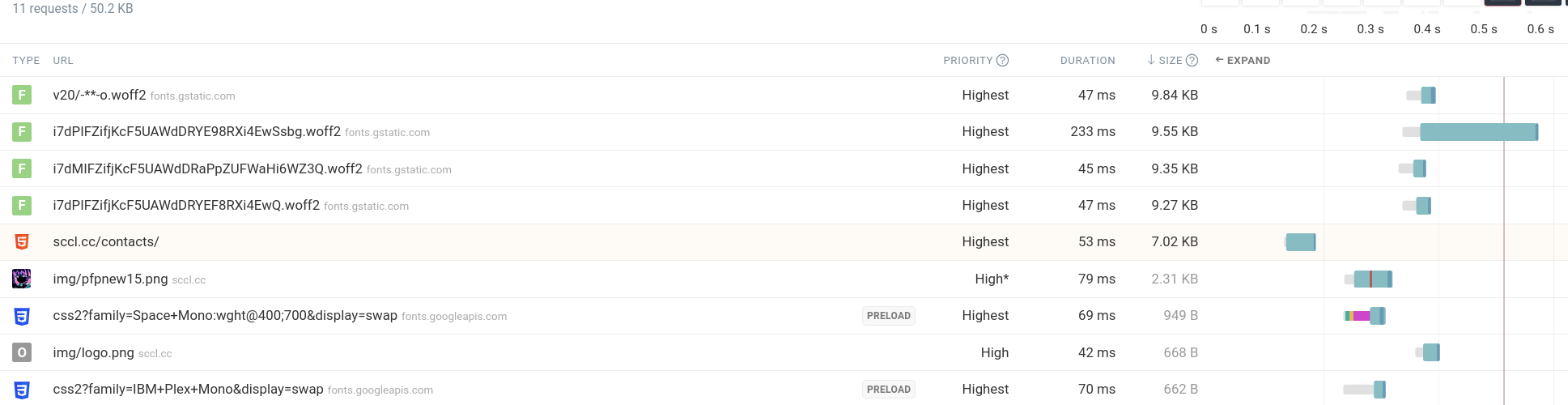 screenshot is already a bit optimized, it was worse :skull:
(before migrating to zine it was 150+kb, see Migration-from-Astro-to-Zine.md)
Four requests per page, for content that collectively weighs practically nothing.
All this considering the full setup (DNS + TCP + TLS) happens once (keep-alive, HTTP/2). But even then - for every new tab, every navigation from another page - a new setup.
Optimization
Plan: everything in one HTML. Base64 inline everything, zero external requests. And fits in initcwnd.
Font
This was the fattest thing on the site:
I had 2 fonts, plus their bold versions downloaded separately, totaling 40kb.
Honestly, custom fonts are fucking unnecessary in most situations, but I really wanted to give in to aesthetics and keep one, stripping the font file down to only ASCII characters actually used on the site.
Result: 4.2kb, which in base64 became 5.7kb of text in the HTML.
Avatar
Initial was ultra fat, even though it’s pixel art, rendered at 400% resolution.
After running through a shakalizer - the image was first reduced to three colors, which in PNG still weighed 1.9kb. But converting to WebP got it down to 702b.
Base64 → 940b.
Favicon
Same manipulations as the avatar - got to 199b, but kept it as png since for tiny images it works better.
268b in base64.
JS
There was a lot to cut here, since I have plenty of truly useless scripts made for aesthetics. But I still wanted to keep all the functionality on the site, so all that crap went inline.
I’ve got animated buttons, an animated background, and an easter egg with animation - all totaling about 4kb, without which the site would work perfectly fine.
Result
Before: 4 requests, ~50kb total
After: 1 request, 12kb gzip / 27kb raw
Fits in initcwnd: One TCP packet - one round trip for data.

Dilemma
Inlining everything is a tradeoff.
When navigating to another page, the browser downloads the same font again - the font is inside the HTML, it doesn’t get cached separately. With a separate file, the font would be cached after the first load, and the second page would load without it.
Also keep in mind that inline usually weighs a bit more than an external dependency, and if we’re already not exceeding initcwnd - then we don’t need inlining.
Example
1. Everything in one HTML (base64 fonts)
- 2 pages at 14kb each
- each loads in 1 round trip
- but each time you eat the full 14kb, even if the font is repeated
2. HTML + separate font
- 2 pages at 8kb + 4kb font separate
- first visit: 2 requests (HTML + font)
- navigation between pages: only 8kb (font cached)
In the real internet, you won’t feel the difference between 14kb and 8kb load speed.
But delays between packets - you will.